.png)
Every product sitting on your warehouse shelves is cash. But without the right system, it’s nearly impossible to know the true cost and profitability of each SKU. You need to see the full picture, from landed costs to final sale, to understand your margins and make smart financial decisions. This is where inventory and finance must connect. A powerful warehouse inventory management software does more than just count your stock; it transforms your operational data into actionable financial intelligence, giving you a clear, up-to-the-minute view of your company’s health and helping you protect your bottom line.
Key takeaways
- Solve your specific operational pains first: Before you start comparing software, pinpoint your biggest challenges, like frequent stockouts or fulfillment errors. This list of problems becomes your scorecard for finding a solution that has a real impact on your daily operations.
- Connect inventory data to your bottom line: The best systems do more than just count stock. Look for software that offers SKU-level financial insights and automates processes like landed cost allocation, giving you a true, up-to-the-minute picture of your product margins.
- Choose a scalable partner for long-term growth: The right software should support your business for years to come. Assess a vendor’s implementation process, customer support, and ability to handle future growth to ensure you’re making a sustainable investment, not just a quick fix.
What is warehouse inventory management software?
At its core, warehouse inventory management software is a system that helps you keep track of every single product inside your warehouse. Think of it as the brain of your storage operations. It’s designed to answer three critical questions at any given moment: What items do you have? Where are they located? And when do they move? Instead of relying on clipboards or complex spreadsheets, this software gives you a real-time, digital view of your entire stock.
This technology is built to handle the constant flow of goods in and out of your facility. From the moment a shipment arrives at the receiving dock to the second an order is picked, packed, and shipped to a customer, the software logs every touchpoint. It creates a clear, traceable history for each SKU, which is essential for maintaining accurate counts, preventing stockouts, and ensuring you can find what you need, when you need it. For any business dealing with physical goods, it’s the foundation for a smooth, efficient, and scalable operation.
What it does for your business
Warehouse inventory management software is designed to simplify the complexities of your stockroom and make your entire operation more efficient. It acts as a central hub that tracks all inventory movements, from receiving new stock to fulfilling customer orders. By using tools like barcode scanners, you can dramatically reduce human error and speed up tedious data entry tasks. This means your team spends less time on manual counts and more time getting orders out the door. The system helps you keep your stockroom organized, ensuring every item has a designated place, which makes picking and packing faster and more accurate. Ultimately, it gives you the control and visibility needed to run a tighter, more profitable warehouse.
How it beats old-school methods
If you’ve ever managed inventory with a spreadsheet, you know how quickly it can become a bottleneck. As your business grows, manual tracking becomes nearly impossible to maintain accurately. This is where warehouse inventory management software makes a huge difference. Unlike static spreadsheets, a dedicated system provides real-time data, tracks inventory across multiple locations, and manages complex processes like bin location and order fulfillment automatically. A modern WMS enhances warehouse operations by delivering higher inventory accuracy, which means fewer stockouts and backorders. It also helps reduce labor costs by optimizing workflows and improves customer satisfaction by ensuring orders are fulfilled correctly and on time. It’s the leap from guessing to knowing.
A recent episode of the Blue Ocean by StartOps podcast dives into the future of warehouse inventory software
What features matter most in warehouse inventory software?
When you start comparing warehouse inventory software, the sheer number of features can feel overwhelming. Instead of getting lost in the details, focus on the core functions that will actually make a difference in your day-to-day operations. The right software should give you clarity, not complexity. It’s about finding a system that automates the tedious work, provides a clear view of your inventory and financials, and scales with you as you grow. Let’s walk through the essential features you should look for.
Track every SKU in real time
Knowing exactly what you have and where it is. down to the last unit. is non-negotiable. Real-time, SKU-level tracking is the foundation of modern inventory management. This feature eliminates the guesswork that leads to stockouts or costly overstocking. When you can track all inventory movements as goods arrive, move through your warehouse, and ship to customers, you gain complete control. This visibility means you can answer customer questions confidently, fulfill orders accurately, and make smarter purchasing decisions because you’re working with data that’s always up to date. It’s the difference between reacting to problems and preventing them altogether.
Automate reordering and forecast demand
Manually tracking stock levels and placing purchase orders is not only time-consuming but also prone to human error. The best warehouse software automates this process by setting reorder points for each SKU. When inventory dips below a certain threshold, the system can automatically generate a purchase order for you to approve. Even better, advanced systems use your sales data to forecast future demand. For CPG brands, effective inventory management directly impacts cash flow and efficiency. By predicting what your customers will want, you can ensure you have the right products on hand without tying up capital in slow-moving stock.
Connect all your sales channels
If you sell on your own website, through Amazon, and in retail stores, you know how challenging it can be to keep inventory levels straight. Selling a product you don’t actually have is a quick way to disappoint a customer. That’s why your software must connect all your sales channels into one centralized system. This creates a single source of truth for your inventory, automatically updating stock counts across every channel whenever a sale is made. Whether you’re managing your own warehouse or also using Amazon FBA locations, this synchronization prevents overselling and ensures a smooth customer experience, no matter where they buy from.
Simplify with barcode and RFID scanning
Manual data entry is a recipe for typos and misplaced inventory. Integrating barcode or RFID scanning into your warehouse workflow is one of the most effective ways to improve accuracy and speed. From receiving new shipments to picking, packing, and shipping orders, scanning items at each step confirms you have the right product and updates your inventory records instantly. This technology helps simplify inventory problems and reduces the time your team spends on tedious administrative tasks. It also creates a detailed history for every item, making it easier to trace products and handle any issues that might come up.
Get clear financial reports and cost breakdowns
Your inventory is one of your biggest assets, so your warehouse software should give you a clear picture of its financial impact. It’s not enough to just know your stock levels; you need to understand the costs associated with each SKU. This includes the purchase price, shipping, duties, and storage fees. also known as landed costs. The right software automates cost allocation and provides accurate, GAAP-compliant financial reports. By tracking key metrics like order accuracy and inventory turnover, you can see exactly how your warehouse operations contribute to your bottom line and make informed decisions to improve profitability.
Use analytics to see what's working
Data is your best tool for strategic growth. Your warehouse inventory software should do more than just store information; it should help you understand it. Look for a platform with strong analytics and reporting capabilities that turn your operational data into actionable insights. Which products are your bestsellers? Which ones are collecting dust? How long does it take to turn inventory into revenue? Tracking the right inventory KPIs is essential for optimizing your supply chain, reducing costs, and keeping customers happy. With clear dashboards and customizable reports, you can spot trends, identify opportunities, and build a more resilient and profitable business.
A look at top warehouse inventory software
Choosing the right warehouse inventory software can feel like a huge task. The market is packed with options, each promising to be the perfect solution for your business. Some are standalone tools that do one thing really well, while others are part of a much larger suite of business management software. How do you even begin to compare them? The key is to focus on what your business truly needs right now and where you see it going in the next few years. Are you a growing e-commerce brand struggling to keep up with multichannel sales? Or are you a manufacturer who needs to track raw materials through to finished goods?
The best software for your business will give you clear, real-time visibility into your stock, automate tedious manual tasks, and connect seamlessly with the other tools you rely on, like your accounting software or e-commerce platform. It should provide insights that help you make smarter decisions about purchasing, pricing, and sales. To help you get a feel for what’s out there, I’ve put together a list of some of the top contenders in the space. We’ll look at a mix of modern, AI-powered platforms and established industry favorites to give you a well-rounded view of your options.
1. Mandrel
Mandrel is a newer, AI-native platform built specifically for businesses that sell physical products. What makes it different is its deep focus on the SKU as the center of the universe. It connects your inventory data directly to your financial data, giving you a real-time, SKU-level view of your revenue, costs, and profitability. This means you can finally get accurate, up-to-the-minute answers on your margins for every single product. Mandrel also automates complex financial workflows like landed cost allocation and revenue recognition, ensuring your books are always accurate and audit-ready. If you’re looking for a system that provides true financial intelligence from your inventory data, you can book a demo to see how it works.
2. NetSuite Inventory Management
NetSuite is a powerful inventory solution embedded within a broader ERP system. For companies with multi-location warehouses and complex operations, its ability to unify accounting, CRM, and ecommerce under one platform is compelling. It provides real-time inventory visibility and can support advanced workflows as a business scales.
The tradeoff for many warehouse-driven product brands is complexity. NetSuite implementations often require certified partners, extended setup timelines, and ongoing configuration management. Small and mid-sized businesses can find themselves navigating enterprise-level infrastructure when their primary need is operational and financial clarity at the SKU level. While robust, the system may introduce more overhead than lean teams are prepared to manage.
3. Zoho Inventory
Zoho Inventory is well-suited for multichannel ecommerce sellers. Its integration within the broader Zoho ecosystem makes it easy to sync inventory with Zoho Books and CRM tools, and its user-friendly interface lowers the adoption barrier.
However, Zoho works best inside its own ecosystem. If your warehouse workflows, accounting processes, or logistics providers sit outside Zoho, integrations can become connector-heavy. Zoho focuses primarily on stock tracking and order management. For businesses that need warehouse data tightly tied to financial performance and automated landed cost accuracy, the platform may require additional manual reconciliation outside the system.
4. Cin7
Cin7 offers strong multichannel inventory synchronization and supports production management for product-centric brands. It is designed to centralize inventory, B2B ordering, POS integration, and warehouse management within one environment.
That breadth can introduce configuration complexity. Many businesses require significant setup to align Cin7 workflows with their specific warehouse operations. While it centralizes inventory data, financial automation, and SKU-level profitability often still depend on accounting integrations. For brands focused on margin precision and cash flow clarity, inventory centralization alone may not be enough.
5. Fishbowl Inventory
Fishbowl is a long-standing solution for manufacturers and warehouse operators, particularly those using QuickBooks. It adds advanced tracking, work orders, and multi-location control to an existing accounting system.
Because it functions as an add-on rather than a fully unified architecture, inventory and financial systems remain distinct. This separation can increase reconciliation work as transaction volume grows. For warehouse-driven CPG brands managing landed costs, promotions, and freight variability, disconnected systems can create blind spots in true SKU-level profitability.
6. inFlow Inventory
inFlow is known for being intuitive and affordable. It helps small and mid-sized businesses track stock, manage orders, and improve warehouse accuracy through barcode scanning.
The limitation is depth. As warehouse complexity grows, including multiple locations, third-party logistics partners, and variable freight costs, basic inventory tracking may not provide the financial insight required to scale efficiently. Advanced landed cost allocation and real-time margin visibility are not core strengths, which can leave growing brands relying on spreadsheets for deeper analysis.
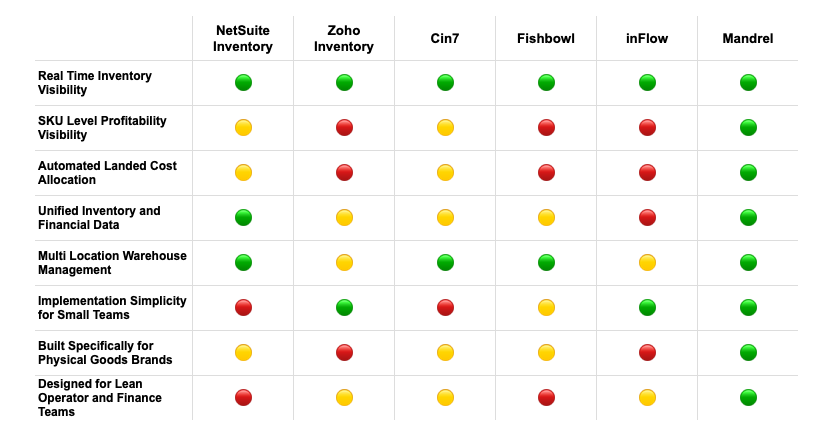
🟢 = Strong / Core Strength
🟡 = Available but Limited or Requires Add-Ons
🔴 = Not Core Focus / Structural Limitation
How much does warehouse inventory software cost?
Let's talk about the big question: what’s the price tag? The cost of warehouse inventory software can range widely, from a couple of hundred dollars a month for a basic plan to tens of thousands for an enterprise-level system. The final number depends on the complexity of your operations, the number of SKUs you manage, and the specific features you need. But it’s not just about finding the cheapest option; it’s about understanding the different pricing models so you can find a solution that fits your budget without any surprise fees down the road.
Most modern software operates on a subscription basis, which bundles the software, support, and updates into a recurring fee. However, you’ll also find providers that offer a one-time license if you prefer a larger upfront investment. The pricing structure itself can also vary. Some vendors charge based on how many people will use the software, while others base it on the number of warehouses or even the volume of orders you process. Digging into these details is the best way to accurately compare your options. The goal is to find a system that not only solves your current inventory headaches but also scales with you as your business grows. Before you can calculate your potential return on investment, you need a clear picture of the total cost, not just the monthly fee.
Subscription vs. one-time license
The most common pricing model you'll encounter is the subscription, or Software-as-a-Service (SaaS), model. You’ll pay a recurring monthly or annual fee, which typically includes access to the software, customer support, and all future updates. This approach makes costs predictable and manageable as an operating expense. On the other hand, some providers offer a one-time license fee. This involves a significant upfront investment to own the software outright. While it might seem appealing to pay once and be done, remember that this type of license often comes with separate, additional costs for ongoing maintenance, support, and major upgrades.
Paying per user vs. per warehouse
Two other common ways vendors structure their pricing are per user or per warehouse. With a per-user model, the cost is directly tied to the number of team members who need access to the system. This can be a great fit for a small team operating out of a single, large facility. In contrast, a per-warehouse model bases the fee on the number of physical locations you manage. If you have multiple small warehouses with only a few staff members at each, this might be the more economical choice. It’s important to evaluate your operational scale and team size to figure out which structure aligns best with your business needs and avoids unnecessary costs.
Pricing based on volume
For businesses with fluctuating sales cycles, volume-based pricing can be a game-changer. Instead of a flat fee, your cost is tied to your activity level. like the number of orders you ship or the total value of inventory you manage each month. This model offers incredible flexibility, especially for seasonal brands or companies in a high-growth phase. Your software costs scale up or down with your revenue, so you aren’t stuck paying for capacity you don’t need during slower periods. This usage-based approach ensures that your expenses are more closely aligned with your actual business performance, making financial planning a little easier.
Understanding the total cost of ownership
The initial price you see on a vendor’s website is rarely the full story. To get a true sense of the investment, you need to consider the Total Cost of Ownership (TCO). This includes the sticker price plus all the other expenses required to get the software running and keep it that way. Think about one-time implementation fees, data migration costs, and any essential team training. You should also ask about ongoing expenses for customer support, maintenance, and potential upgrades. A good vendor will be transparent about these figures, so be sure to ask for a complete breakdown of all potential costs before you commit.
Deciding to bring in new software is a big step, and it’s smart to look at the full picture before you commit. Warehouse inventory software can completely change how you operate. Mostly for the better. But it’s not without its challenges.
The pros and cons of warehouse inventory software
Deciding to bring in new software is a big step, and it’s smart to look at the full picture before you commit. Warehouse inventory software can completely change how you operate. Mostly for the better. But it’s not without its challenges. Understanding both sides helps you make a choice that truly fits your business and sets you up for success. It’s about finding a tool that solves more problems than it creates and gives you a clear path to a stronger, more efficient operation.
✓ The upside: A more efficient operation
The biggest win with warehouse inventory software is how much smoother your entire operation becomes. Think faster, more accurate order fulfillment, which leads directly to happier customers. By automating tasks that used to be done manually, you reduce human error and free up your team to focus on more important work. You’ll gain a much clearer view of your inventory, which means fewer stockouts and less money tied up in overstock. The right system improves inventory accuracy, cuts down on labor costs, and helps you get orders out the door faster. It’s about creating an optimized, efficient workflow from the moment inventory arrives to the second it ships.
X The downside: Potential drawbacks to consider
While the benefits are compelling, there are potential hurdles to be aware of. The initial setup can be a significant project, requiring time, resources, and a solid plan. Some off-the-shelf systems can be inflexible, offering only basic functionality that you might quickly outgrow. These implementation challenges can disrupt your business if not managed carefully. There’s also the cost. not just of the software itself, but of training your team and potentially updating hardware. It’s important to anticipate these factors so you can budget and plan accordingly, ensuring a smooth transition rather than a chaotic one.
What to expect for your return on investment (ROI)
So, is it worth it? The return on your investment comes from turning data into decisions. By tracking the right metrics, you can see exactly how the software is impacting your bottom line. You’ll be able to measure improvements in order accuracy, fulfillment speed, and inventory turnover. These aren’t just abstract numbers; they translate to real savings in labor, reduced carrying costs, and increased sales from preventing stockouts. A good system provides the tools to monitor these key warehouse performance metrics, giving you a clear view of your ROI and highlighting opportunities to make your operation even more profitable.
What to expect during implementation
Switching to a new warehouse inventory management system is a big move, but it doesn't have to be a headache. Knowing what’s coming can make the entire process feel much more manageable. Think of it as a project with a few key phases: setup, training, data migration, and ongoing support. With a clear plan, you can get your new system up and running smoothly and start seeing the benefits faster. The goal is to prepare your business and your team for a change that will ultimately make everyone's job easier and your operations more efficient.
Getting through the initial setup
First things first: your new software needs to connect with the other tools you already use. Your warehouse management system (WMS) won't operate in a silo. A successful implementation requires integration with your existing systems, including your ERP, order management platforms, and ecommerce storefronts. This step is all about creating a seamless flow of information across your entire business. When your WMS can talk to your sales channels and accounting software, you get a single, reliable source of truth for every order, every SKU, and every dollar. This initial technical setup is the foundation for everything else, so it’s worth taking the time to get it right.
Training your team for the switch
A new tool is only as good as the team using it. Getting your people comfortable with the software is just as important as the technical setup. The most common challenges here often revolve around getting everyone on board and trained properly. Instead of just dropping a new program on your team, walk them through why you’re making the change and how it will help them. Plan for dedicated training sessions that go beyond a simple demo. Let your team get hands-on with the software in a test environment so they can build confidence before it goes live. Good change management is about communication and support, ensuring everyone feels prepared for the new way of working.
Moving your data over
Next, you’ll need to move your inventory data from your old system. whether that’s spreadsheets or another software. into the new one. This is a critical step where precision is everything. Data migration accuracy is essential to make sure all your historical sales data, supplier information, and current inventory levels are transferred correctly. Any errors here can lead to phantom stock, inaccurate financial reports, and fulfillment headaches down the line. Before you migrate, take the opportunity to clean up your existing data. Get rid of duplicates, fix errors, and make sure everything is standardized. A clean data transfer sets you up for success and ensures you can trust the numbers in your new system from day one.
Planning for ongoing maintenance
Getting your new system live is a huge milestone, but the work doesn't stop there. Think of your WMS as a long-term investment that will grow with your business. A well-implemented system will support your current growth strategy and help you scale for years to come. This means having a plan for ongoing support and maintenance. You’ll want to know how software updates are handled, what kind of customer support is available if you run into issues, and how you can adapt the system as your business needs change. Regular check-ins will help you make sure you’re still getting the most out of your software long after the implementation is complete.
How to measure your success
Once you’ve implemented new warehouse inventory software, how do you know it’s actually making a difference? Success isn’t just a feeling. it’s something you can measure with clear data. The right platform doesn’t just streamline your operations; it gives you the tools to track your performance and prove your return on investment. Instead of spending hours digging through spreadsheets to connect the dots, you can get an instant read on the health of your warehouse from a single dashboard.
Think of these metrics as your operational vital signs. They tell you what’s working well and where you might have a bottleneck that needs attention. By regularly checking a few key performance indicators (KPIs), you can make smarter, data-driven decisions that improve efficiency, lower costs, and keep your customers happy. The best part is that modern systems often track these automatically, presenting them in easy-to-understand visuals. This gives you a constant, real-time view of your progress, allowing you to spot trends and fix small issues before they become big problems. It’s about moving from reactive problem-solving to proactive management, all backed by solid numbers.
Track order accuracy and fulfillment
Getting the right product to the right person on time is the foundation of a great customer experience. Your order accuracy rate measures how often you get it perfect. A high rate means happy, loyal customers, while a low one leads to costly returns and damages your reputation. Regularly monitoring this metric helps you pinpoint where things are going wrong. With clear data, you can implement process improvements, offer better staff training, or adjust your workflows to ensure a higher rate of successful deliveries. Software with barcode scanning and real-time checks can nearly eliminate picking and packing errors, pushing your accuracy rate closer to 100%.
Monitor inventory turnover and costs
Your inventory is one of your biggest assets, but it can also be a liability if it’s not managed well. Inventory turnover measures how quickly you sell through your stock, which is a key indicator of your operational efficiency and cash flow. A healthy turnover rate means you aren’t tying up capital in slow-moving products. Good software helps you avoid the twin problems of overstocking (which increases carrying costs) and stockouts (which lead to lost sales). By tracking this metric, you can optimize your purchasing and keep your inventory lean and profitable.
Measure labor productivity
Your team is the engine of your warehouse, and understanding their productivity is essential for running a smooth operation. Metrics like orders picked per hour, items packed per day, or receiving time per shipment give you clear insights into how efficiently your team is working. This isn't about micromanaging; it's about identifying opportunities to make their jobs easier. Maybe one part of the warehouse layout is causing delays, or perhaps additional training on the new software could speed things up. Tracking labor productivity helps you support your team and get the most out of every shift.
Check your Real-Time tracking performance
One of the biggest advantages of modern inventory software is the ability to see what’s happening right now. Instead of waiting for a weekly or monthly report, you can access live dashboards with your most important warehouse metrics. This real-time SKU-level visibility tells you exactly how your operation is functioning at any given moment. You can track receiving, picking, packing, and shipping as they happen, giving you the agility to respond to challenges instantly. This immediate feedback loop is what allows you to continuously refine your processes and maintain peak efficiency day in and day out.
How to choose the right software for your business
Picking the right warehouse inventory software is a lot like hiring a key team member. You’re not just looking for a list of qualifications; you’re looking for the right fit for your company’s culture, challenges, and future goals. The market is full of options, each with its own strengths. The key is to move past the flashy sales pitches and focus on what your business truly needs to operate smoothly and grow efficiently.
A systematic approach will help you cut through the noise. Instead of getting overwhelmed by demos and feature lists, start by looking inward at your own operations. What’s working? What’s breaking? Where are the bottlenecks that are costing you time and money? By understanding your specific pain points and long-term vision, you can create a clear scorecard to measure each potential software solution against. This process ensures you invest in a system that solves today’s problems and supports tomorrow’s ambitions, turning your inventory management from a liability into a strategic asset. The right AI-native ERP can transform your data into your most powerful tool for growth.
Step 1: Start by assessing your current challenges
Before you can find the right solution, you need to have a crystal-clear understanding of the problem. If your business is growing quickly, you’ve likely noticed that the manual processes and simple spreadsheets that used to work are now starting to crack under the pressure. These growing pains are a sign that it’s time for an upgrade.
Take a moment to pinpoint exactly where things are going wrong. Are you constantly running out of your best-selling products? Are fulfillment errors leading to unhappy customers and costly returns? Maybe your team is spending hours manually reconciling inventory data with your accounting records. Make a list of your top three to five challenges. This simple exercise will become your north star, guiding your search and helping you focus on software that directly addresses the issues holding your business back.
Step 2: Define your must-have requirements
With your challenges clearly defined, you can now translate them into a checklist of must-have software features. This isn’t a "nice-to-have" list; these are the non-negotiables your business needs to function effectively. Think about the specifics of your operation. How many SKUs are you managing? Do you need robust barcode or RFID scanning capabilities to speed up receiving and picking? What other systems, like your ecommerce platform or accounting software, does the new inventory system need to connect with?
Also, consider your budget and team structure. Is a cloud-based subscription model a better fit than a one-time on-premise license? Creating a detailed list of your inventory management requirements will make it much easier to disqualify vendors that aren’t a good fit and zero in on the ones that are.
Step 3: Think about future growth and integrations
The software you choose today should be able to support your business in three, five, or even ten years. A system that can’t scale with you will quickly become another operational bottleneck. As you evaluate options, ask vendors how their platform handles increasing order volumes, additional warehouses, and expanding product lines. Look for a solution built for companies in their growth phase, as it will offer the right balance of functionality and flexibility.
Equally important are integrations. Your inventory management software doesn't operate in a vacuum. It needs to seamlessly share data with your other business-critical systems. A lack of integration creates data silos and forces your team into manual workarounds. Ensure any potential system can connect with your existing tech stack to create a single source of truth for your entire operation, from sales to finance.
Step 4: Compare vendor support and setup options
Powerful software is only as good as the team that helps you implement and use it. The transition to a new system can be disruptive, so you want a partner who will make the process as smooth as possible. When talking to vendors, dig into the details of their onboarding process. Will they help you migrate your existing data? What does team training look like? A vendor who invests in your success from day one is a strong indicator of a good long-term partnership.
Don’t forget to ask about ongoing support. What happens when you run into an issue or have a question? Is there a knowledgeable support team you can easily reach? Booking a demo is a great way to get a feel for a company’s culture and ask these critical questions directly.
Related articles
- ERP for Small Business: 6 Best Systems Reviewed (2026)
- Manufacturing ERP 101: Your Definitive Guide
- SKU-Level Economics: What Your Gross Margin Isn’t Telling You
- Inventory Management System: What It Is and Why You Need One
- Navigating The Impact of Tariffs on Margins
Frequently asked questions
My business is still small. When is the right time to move from spreadsheets to actual software?
The tipping point usually arrives when the time you spend managing your spreadsheet starts costing you more than the software would. If you're experiencing frequent stockouts, fulfillment errors, or can't get a clear picture of your inventory without hours of manual work, it's time. Think of it less as a question of size and more about complexity. Once you're selling on multiple channels or your SKU count makes manual tracking a constant headache, a dedicated system will save you time, money, and customer trust.
What's the difference between a warehouse management system (WMS) and an ERP?
Think of a WMS as a specialist focused entirely on the four walls of your warehouse. it manages receiving, put-away, picking, packing, and shipping. An Enterprise Resource Planning (ERP) system is more like a general manager for your entire business. It handles inventory but also connects it to everything else, including finance, sales, and customer relationships. Modern, AI-native ERPs like Mandrel take this a step further by centering the entire business around your SKUs, linking operational data directly to your financial reporting for a complete picture.
How long does it typically take to get new warehouse software up and running?
The timeline can vary quite a bit depending on the complexity of your business and the software you choose. A simple, out-of-the-box system for a single warehouse might be up and running in a few weeks. A more comprehensive ERP implementation with multiple integrations and custom workflows could take a few months. The key factors are how clean your existing data is and how much time your team can dedicate to training and setup. A good vendor will give you a clear, realistic timeline during the sales process.
Can this software really help with my business's finances, or just inventory counts?
Absolutely. In fact, this is one of the most important functions of a modern inventory system. Your inventory is a major financial asset, and simply counting it isn't enough. The right software connects your stock levels to your financial data, automatically calculating things like landed costs for each SKU and providing accurate, real-time profit margin analysis. This transforms your inventory data from a simple count into a powerful tool for making smarter financial decisions.
What if I choose a system and my business outgrows it in a few years?
That's a common and valid concern, which is why planning for future growth is so critical. When you're evaluating options, ask vendors specifically how their platform scales. Look for a system that can easily handle more users, additional sales channels, and multiple warehouse locations without requiring a complete overhaul. Choosing a flexible, cloud-based platform often provides the easiest path for growth, allowing you to add features and capacity as your business needs evolve.