Do you know the true, all-in cost of every product you sell? For many businesses, the answer is a fuzzy "maybe." When you factor in shipping, tariffs, and freight, the actual cost of goods sold can be much higher than you think, making it impossible to know your real profitability at the SKU level. Your inventory is a financial asset, and it deserves to be managed with financial precision. A modern inventory management system software bridges the gap between your warehouse and your accounting team, automating complex calculations like landed costs and providing the transaction-level data you need for accurate, reliable financial reporting.
Key takeaways
- Focus on your specific needs, not just features: Before you start looking, map out your biggest operational challenges and must-have functions. The best system is the one that solves your unique problems and has the flexibility to grow with your business.
- Plan your implementation carefully: A smooth transition depends on more than just the software itself. Create a clear plan for migrating your data, training your team, and connecting your other business tools to prevent disruptions and ensure everyone can use the new system effectively.
- Look for ROI beyond the price tag: The right software is an investment, not just an expense. Calculate its potential return by considering how it can prevent stockouts, reduce carrying costs, and provide true SKU-level financial visibility. Always use free trials and demos to confirm a system can deliver the value you need.
What is inventory management software?
At its core, inventory management software is a system that tracks your products from the moment you order them from a supplier to the moment they land in your customer's hands. Think of it as the digital command center for your physical goods, replacing manual spreadsheets and guesswork with real-time data. This software keeps a running tally of your stock levels, sales, orders, and deliveries across all your locations and sales channels.
The main goal is to give you an accurate, up-to-the-minute view of what you have and where you have it. This helps you avoid costly mistakes like running out of a bestseller (stockouts) or tying up cash in products that aren't moving (overstocking). But modern systems go far beyond simple counting. They automate inventory tasks to make your entire operation more efficient, from the warehouse to your online store.
By centralizing all this information, the software provides a clear picture of your business performance. You can see which products are your top performers, understand sales trends, and make smarter purchasing decisions. The most advanced platforms, often part of a larger AI-native ERP, even connect your inventory data directly to your financials. This gives you a true understanding of your costs and profitability right down to the individual SKU, turning raw data into the intelligence you need to grow.
Choosing the right inventory management software is about more than just counting what’s on your shelves. It’s about finding a system that acts as the central nervous system for your entire operation.
What to look for in inventory management software
Choosing the right inventory management software is about more than just counting what’s on your shelves. It’s about finding a system that acts as the central nervous system for your entire operation. The best software gives you a clear, real-time picture of your business, from the moment an order is placed to the second it lands on a customer's doorstep. It should simplify your daily tasks, connect your various tools, and provide the insights you need to make smarter decisions. As you evaluate your options, look for a solution that not only solves your current inventory headaches but also has the flexibility to grow with you. Here are the core features that will make the biggest impact on your efficiency and profitability.
✓ Track inventory in real time
Your inventory levels are constantly changing, and relying on manual spreadsheets is a recipe for error. Look for software that tracks your stock levels, orders, sales, and deliveries automatically and in real time. This live visibility is your best defense against costly stockouts and overstocking, which ties up cash in slow-moving products. When you know exactly what you have and where it is at all times, you can make confident decisions about purchasing, marketing, and sales. Real-time tracking means your entire team is working from a single, accurate source of truth, eliminating confusion and improving operational flow.
✓ Integrate with all your sales channels
Your business likely operates across multiple platforms, from your own website to marketplaces like Amazon. Your inventory software needs to connect seamlessly with all of them. A solid system will integrate with your ecommerce platforms, point-of-sale (POS) systems, and accounting software. This ensures that when a sale happens anywhere, stock levels are updated everywhere automatically. Without these integrations, you’re left manually reconciling data, which is time-consuming and prone to mistakes. A well-connected system centralizes your operations, giving you a unified view of your business performance without the manual data entry.
✓ Automate reordering and get stock alerts
One of the biggest time-savers an inventory system can offer is automation. Instead of manually checking stock levels and placing purchase orders, the software can do it for you. Look for features that allow you to set automatic reorder points for each product. When inventory dips below that threshold, the system can either notify you or automatically generate a purchase order to send to your supplier. These low-stock alerts are critical for preventing stockouts on your best-selling items. This level of automation frees you up to focus on growing your business, not just managing it.
✓ Manage orders from sale to fulfillment
Effective inventory management extends beyond the warehouse shelf. Your software should support the entire order lifecycle, from the moment a customer clicks "buy" to the final delivery. This includes generating pick lists for your warehouse team, integrating with shipping carriers to print labels, and sending tracking updates to customers. A system that streamlines order fulfillment not only makes your internal processes more efficient but also creates a better, more transparent experience for your customers. When they know where their order is every step of the way, they’re more likely to become repeat buyers.
✓ Get clear reports and analytics
Your inventory data is a goldmine of insights, but only if you can access and understand it. The right software will generate clear, easy-to-read reports that help you analyze sales trends, identify your most and least profitable products, and forecast future demand. Look for customizable dashboards that put your most important metrics front and center. With strong analytics, you can move beyond guesswork and make data-driven decisions to optimize your stock levels, improve your marketing efforts, and increase your overall profitability. This is how you turn historical data into a strategic advantage.
✓ Connect financials and track true costs
Your inventory is one of your biggest assets, and its management directly impacts your financial health. The best systems don’t just track quantities; they connect inventory data to your financials. This is crucial for understanding your true costs and profitability at the SKU level. Look for a platform that can handle complex calculations like landed costs, which include shipping, taxes, and fees. When your inventory and financial data are in sync, you get an accurate view of your cash flow and margins, allowing you to build a more resilient and profitable business.
BLOG: What “AI-Native ERP” Actually Means (And What It Doesn’t)
A look at the top inventory management software
Choosing the right inventory management software can feel overwhelming, but it ultimately comes down to finding a system that matches the complexity of your operations. Some platforms are designed for production planning, others for ecommerce order synchronization, and others for basic stock tracking across retail locations.
The important thing to remember is that inventory software categories vary widely in scope. Many tools are built primarily to track quantities or coordinate orders, while others aim to connect operational activity directly to financial reporting and cost analysis.
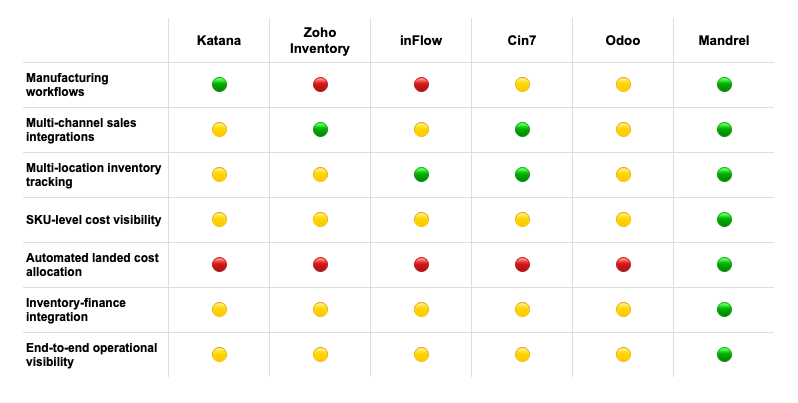
Below are several widely used platforms in the space. Each has strengths depending on the type of business you run, but they also differ significantly in how much operational and financial visibility they provide.
1. Mandrel: AI-native ERP for physical goods businesses
Mandrel is an AI-native ERP built specifically for companies that sell physical products. Instead of focusing only on inventory quantities, it connects operations and finance around the SKU. This allows brands to track revenue, inventory value, and true costs at the transaction level.
Mandrel automates many of the manual workflows that teams typically handle in spreadsheets, including document ingestion, landed cost allocation, and inventory-related financial reporting. This creates a unified system of record that helps operators understand both where inventory is and what it actually costs.
For growing CPG brands that need accurate financial reporting, auditability, and operational visibility, Mandrel provides a comprehensive platform designed to scale with the business.
2. Katana: Manufacturing-focused inventory management
Katana is designed primarily for manufacturers that need to manage production workflows and raw material consumption. Its strengths lie in bill-of-material tracking, production scheduling, and monitoring inventory as it moves through the manufacturing process.
However, Katana is primarily focused on operational production management. Businesses that require deeper financial visibility often rely on external accounting systems to analyze true costs or margins. As operations grow more complex, teams may still need spreadsheets or additional tools to reconcile production activity with financial outcomes.
For companies focused mainly on production coordination, Katana can be a strong operational tool, though it may require complementary systems for more advanced financial analysis.
3. Zoho Inventory: Small to medium business solution
Zoho Inventory is a flexible platform designed for small and medium-sized businesses that want to manage inventory, orders, and shipping from a centralized dashboard. Its biggest strength is integration. The platform connects easily with ecommerce storefronts, payment gateways, and the broader Zoho ecosystem.
That said, Zoho Inventory is generally designed for small business operations rather than complex supply chains. Businesses that manufacture their own products or need detailed cost tracking often rely on additional accounting or analytics tools to fully understand product margins and inventory value.
For organizations already using Zoho products, the platform can be a convenient way to manage inventory alongside other business systems.
4. inFlow: Multi-location inventory tracking
inFlow focuses on helping businesses track inventory across multiple locations, such as warehouses or retail stores. The platform includes useful features like barcode scanning and location-based stock tracking, which help simplify day-to-day inventory operations.
However, inFlow is primarily designed for inventory quantity tracking rather than financial inventory analysis. Businesses that need detailed landed cost allocation, SKU-level profitability insights, or integrated financial reporting may still need to export data into external systems for deeper analysis.
For companies whose primary challenge is managing inventory across multiple locations, inFlow offers a straightforward and accessible solution.
5. Cin7: Omnichannel inventory management
Cin7 is built for businesses that sell across multiple channels, including ecommerce stores, online marketplaces, and wholesale distribution. The platform acts as a central hub for coordinating orders and inventory across those channels, helping reduce the risk of overselling.
Its strength lies in integration with ecommerce and retail systems. However, because it focuses primarily on order orchestration and inventory synchronization, financial inventory analysis often depends on integrations with external accounting platforms.
For brands managing complex sales channels, Cin7 can provide useful operational coordination, though deeper cost visibility may require additional financial tooling.
6. Odoo: Open-source inventory solution
Odoo offers an open-source ERP platform with a broad suite of applications, including an inventory management module. The system can be highly customizable, which makes it appealing for businesses with technical teams that want flexibility.
However, that flexibility can also introduce complexity. Implementing and maintaining an Odoo environment often requires configuration, development resources, and ongoing system management. For many companies, the technical overhead involved in customizing and maintaining the platform can become a significant operational consideration.
Organizations that already have development resources or IT support may benefit from Odoo’s flexibility, while smaller teams sometimes find the implementation process more involved than expected.
Why many companies eventually need more than inventory tracking
Many inventory tools are designed primarily to answer one question: how much stock do we have?
As businesses grow, however, teams need answers to more complex questions:
-
What does each SKU actually cost after freight and fees?
-
How do inventory movements affect financial reporting?
-
What margins are we generating across products and channels?
-
How much capital is tied up in inventory today?
Answering those questions often requires combining operational data with financial workflows, which many traditional inventory tools were not originally designed to handle.
Modern ERP platforms are increasingly designed to bridge that gap by connecting inventory activity directly to financial outcomes, giving operators a clearer understanding of both the physical and economic performance of their products.
How is inventory management software priced?
Finding the right inventory management software is one thing; figuring out how much it will cost is another. Prices can range from free to several hundred or even thousands of dollars per month, so it helps to understand the common pricing models before you start your search. Most modern inventory tools operate on a Software-as-a-Service (SaaS) model, which means you pay a recurring fee for access to the platform rather than buying the software outright.
The final price you pay often depends on a combination of factors, including your monthly order volume, the number of users who need access, the specific features you require, and the number of warehouses or sales channels you operate. This flexible approach allows software providers to serve businesses of all sizes, from a solo entrepreneur just starting out to a large enterprise with complex logistical needs. As we break down the different pricing structures, think about your current operations and where you see your business heading in the next few years. This will help you find a plan that not only fits your budget today but can also scale with you tomorrow.
Monthly and annual subscriptions
The most common way to pay for inventory management software is through a monthly or annual subscription. This gives you continuous access to the software, including regular updates and customer support. Annual plans often come with a nice discount, so it’s worth considering if you’re ready to commit to a tool for the long haul.
Costs typically scale based on your business size and activity. For example, a platform like Katana offers different tiers based on order volume and features, with prices starting around $179 per month for smaller businesses and going up to $799 or more for those with higher volumes and more complex manufacturing needs. This model ensures you’re paying for a level of service that matches your operational scale.
Paying per user vs. per transaction
Within the subscription model, costs are often calculated based on either the number of users or the number of transactions. A per-user model charges a set fee for each team member who needs access to the system. This is straightforward and predictable, especially if your team size is stable.
Alternatively, some platforms base their pricing on transaction volume, such as the number of orders you process each month. This can be a great option for businesses with fluctuating sales, as your costs align directly with your revenue. Many providers, like Zoho Inventory, offer tiered plans that bundle a certain number of users and a cap on monthly orders, giving you a predictable cost structure that grows with your business.
Tiers based on features
Another key factor in pricing is the set of features included in your plan. Most inventory management systems offer several tiers, with each successive level providing more advanced capabilities. A basic plan might include core functions like inventory tracking, order management, and simple reporting.
As you move up to higher-priced tiers, you’ll find more powerful tools. These can include multi-warehouse management, barcode scanning, production planning, and full traceability from raw materials to finished goods. This tiered approach allows you to start with the essentials and add more functionality as your business becomes more complex. It’s a good idea to map out your must-have features versus your nice-to-haves to find a plan that gives you everything you need without paying for extras you won’t use.
What to expect from free vs. paid tools
If you’re just starting out or have very simple inventory needs, a free tool might seem tempting. Some companies offer a completely free plan which can be a great way to get organized without an initial investment. However, these plans are almost always limited in some way, whether it’s the number of SKUs you can track, the monthly order volume, or the features you can access.
Most paid platforms offer a free trial, typically for 14 or 30 days, which is the perfect way to test drive the software. You can connect your sales channels, import some data, and see how it works for your team. While a free plan can be a good entry point, most growing businesses find they quickly need the scalability, advanced features, and dedicated support that come with a paid subscription.
A recent episode of the BlueOcean by StartOps podcast previewed the future of inventory management systems
The pros and cons of inventory management systems
Switching to an inventory management system is a big step, and it’s smart to weigh the good against the not-so-good. While the right software can completely change how you run your business, it's not a magic wand. Knowing what to expect, from the big wins to the potential headaches, helps you make a better choice and plan a smoother transition for your team. Let's walk through what you can generally expect from these systems.
What you'll gain with most systems
The biggest win for most businesses is finally getting a real-time, accurate picture of their stock. Instead of relying on manual spreadsheets, the software tracks your inventory levels, orders, and sales as they happen. This means you can prevent stockouts and avoid tying up cash in overstocked products. Many systems also use barcode scanning to reduce human error during receiving or fulfillment. Plus, they automate tedious tasks, like updating stock counts across all your sales channels whenever an item is sold. You’ll also get access to reports that help you spot sales trends and forecast demand more accurately, so you can make smarter buying decisions.
Common limitations to watch out for
While modern systems are powerful, they aren't all created equal. A common hurdle is integration. Getting your new inventory software to talk to your existing accounting, sales, and shipping tools can be complex and time-consuming. Another frequent complaint is a surprising lack of visibility. Some systems struggle to provide a truly unified, real-time view of stock across different locations or channels, which can defeat the purpose of getting a system in the first place. Many traditional platforms also fall short on demand forecasting, leaving you with stock imbalances and unhappy customers. It's crucial to find a system that offers a truly end-to-end view of your operations.
What to know before you implement
Before you sign any contracts, take a moment to plan. First, think about your team. Adopting new software requires training, so make sure you have a plan to get everyone comfortable with the new workflows. Next, get really clear on what your business needs. A simple retail shop has different requirements than a CPG brand with complex supply chains and multi-component products. Finally, always try before you buy. Most companies offer free trials or demos. Taking the time to request a demo and see the software in action with your own data is the best way to know if it’s the right fit for you.
Big projects like this always come with a few hurdles. But knowing what to expect is half the battle, and with a bit of planning, you can clear them without breaking a sweat.
How to handle common implementation challenges
Switching to a new inventory management system is a big step, and let’s be honest, it can feel a little daunting. Big projects like this always come with a few hurdles. But knowing what to expect is half the battle, and with a bit of planning, you can clear them without breaking a sweat. The most common challenges usually pop up in three key areas: getting your data moved over, getting your team comfortable with the new software, and getting the real-time tracking to work just right. By tackling these head-on, you can make the transition much smoother and start seeing the benefits of your new system faster, without causing major disruptions to your daily operations.
Moving your data and connecting your tools
One of the first technical tasks is getting all your historical data out of your old spreadsheets or software and into the new system. This process, called data migration, needs a clear plan. Before you move anything, take the time to map out exactly where each piece of information will go. This is also a great opportunity to clean up your data, fixing any old errors or inconsistencies. A smooth data migration strategy ensures you’re starting with a clean slate. Equally important is connecting the new software to the other tools you rely on, like your accounting platform or ecommerce store, so that information flows seamlessly across your entire business.
Getting your team on board
A new tool is only as good as the team using it. It’s natural for people to be a little resistant to change, especially if they’re comfortable with the old way of doing things. The key to a successful rollout is solid training and clear communication. Explain why you’re making the switch and how it will make their jobs easier in the long run. Provide hands-on training sessions and create simple guides they can refer back to. By investing in proper employee onboarding for the new software, you empower your team to use it effectively from day one, which leads to better efficiency and a more positive attitude toward the change.
Setting up accurate, real-time tracking
A major reason for upgrading your inventory system is to get a clear, live picture of your stock levels. Disconnected systems often lead to a lack of visibility, making it impossible to know what you have and where you have it. The goal of implementation is to create a single source of truth. This means ensuring your new software is correctly connected to all your sales channels and warehouses. When set up properly, every sale, return, or shipment will update your inventory counts instantly across the board. This real-time visibility is what allows you to make smart, data-backed decisions and avoid costly stockouts or overstocking.
How to choose the right inventory management system for your business
With so many options out there, picking the right inventory management software can feel overwhelming. The key is to find a system that not only solves your current inventory headaches but also supports you as you grow. It’s a big decision, but breaking it down into a few key steps makes it much more manageable. Think of it as creating a checklist for your perfect software match. By focusing on your specific needs, future goals, and budget, you can confidently choose a platform that will become a core part of your operations.
Step 1: Define your business needs
Before you start scheduling demos, the first step is to look inward. What are the biggest challenges in your current process? Are you constantly running out of your best-sellers? Is tracking inventory across multiple warehouses a manual nightmare? Make a list of your must-have features. For example, a retail business might just need basic tracking, while a CPG brand that manufactures its products will need a system that can handle complex bills of materials and work-in-progress inventory. Getting clear on these non-negotiables will help you quickly filter out systems that aren’t the right fit for your business operations.
Step 2: Plan for future growth
The system that works for you today might not work for you in two years. Think about where your business is headed. Are you planning to expand into new markets, add more sales channels, or drastically increase your number of SKUs? Your inventory management system should be a partner in that growth, not a roadblock. Choosing a scalable solution now saves you from the massive headache of migrating all your data to a new platform down the line. Look for a system that can easily handle more users, locations, and transaction volume as your business expands.
Step 3: Check for key integrations
Your inventory management software doesn't operate on an island. It needs to communicate seamlessly with the other tools you rely on every day. Make a list of your current tech stack, including your e-commerce platform, accounting software, shipping carriers, and any third-party logistics (3PL) partners. A system with robust, pre-built integrations will save you countless hours of manual data entry and reduce the risk of costly errors. This creates a single source of truth for your business, ensuring that your inventory, sales, and financial data are always in sync. Mandrel, for example, is built to be the central hub for your physical goods business.
Step 4: Set a budget and calculate potential ROI
Cost is always a factor, but it’s important to look beyond the monthly price tag. Consider the total cost of ownership, which includes any one-time setup fees, training costs, and charges for additional users or features. More importantly, think about the return on investment (ROI). A good system should pay for itself over time by preventing stockouts, reducing carrying costs, and freeing up your team from manual tasks. For example, a system that provides true, SKU-level landed costs can directly impact your profitability. Instead of just seeing it as an expense, view it as an investment in efficiency and smarter financial reporting.
How to measure your inventory management success
Once you have a new inventory management system in place, how do you know if it’s actually working? The goal isn’t just to have software; it’s to see real improvements in your operations and bottom line. Tracking the right key performance indicators (KPIs) will show you exactly where you’re succeeding and where there’s still room to grow. Instead of getting lost in a sea of data, focus on a few core metrics that give you a clear picture of your inventory health.
Inventory turnover rate and days sales of inventory
This metric tells you how many times you sell and replace your entire inventory over a specific period. A higher turnover rate is generally better, as it means you’re selling products quickly without letting them sit on the shelves. This is key for managing your working capital effectively, ensuring money isn't tied up in slow-moving stock. A related metric is Days Sales of Inventory (DSI), which tells you the average number of days it takes to turn your inventory into sales. Tracking both gives you a powerful view of your sales velocity and inventory efficiency. You can use these insights to refine your purchasing strategy and keep your product catalog fresh.
Fill rate and stockout frequency
Your fill rate is the percentage of customer orders you can ship completely without any backorders or delays. It’s a direct measure of how well you’re meeting customer demand. A high fill rate means happy customers who get what they want, when they want it. On the flip side is your stockout frequency, which tracks how often you run out of a specific item. While a 100% fill rate might be unrealistic, frequent stockouts are a red flag. They lead to lost sales and can damage your brand’s reputation. Improving your demand forecasting is one of the best ways to find the right balance, keeping customers satisfied without overstocking.
Order accuracy and carrying costs
Order accuracy measures how often you send the right products to the right customers. It’s a direct reflection of your picking, packing, and shipping process. Inaccurate orders lead to costly returns and unhappy customers, so this metric is crucial. At the same time, you need to watch your carrying costs. These are the expenses tied to holding inventory, like storage fees, insurance, and potential spoilage or obsolescence. The longer an item sits, the more it costs you. An AI-native ERP gives you SKU-level visibility into these true costs, helping you identify slow-moving products and avoid the profit-draining expense of obsolete inventory.
BLOG: SKU-Level Visibility Is the Future of Inventory Management
Finding free trials and demos
Choosing an inventory management system is a big decision. It’s a core piece of your operational puzzle, and you want to be sure it fits your business perfectly before you commit. This software will touch everything from your warehouse floor to your financial reports, so getting it right is essential for smooth operations and accurate data. The good news is you don’t have to make this choice based on a features list alone. Most software providers offer ways for you to get a hands-on feel for their platform, and taking the time to explore these options is one of the smartest moves you can make in your search.
Think of it like test-driving a car. You can read all the reviews and compare specs, but you won’t know how it really handles until you’re behind the wheel. A free trial or a personalized demo gives you that direct experience. It’s your chance to click around, see the interface, and imagine your team using it every day. This step helps you move past the marketing promises and see how the software actually performs on the tasks that matter most to your business. You can see firsthand how it handles complex processes like SKU-level cost tracking or integrating with your existing sales channels, ensuring it’s not just a good system, but the right system for you.
Using trial periods and requesting a demo
Free trials and demos are your best friends during the evaluation process. A free trial typically gives you access to the full software for a limited time, letting you explore on your own. A demo, on the other hand, is a guided tour led by a product expert. It’s a fantastic opportunity to see the system in action and ask specific questions about your unique challenges.
To get the most out of a demo, come prepared with a list of your must-have features and biggest operational headaches. A personalized demo can show you exactly how a system would handle your SKU-level data and automate financial workflows. Involve key members of your team in the process so they can ask questions relevant to their roles and you can get their buy-in from the start.
Looking for new customer offers
While you’re evaluating different platforms, keep an eye out for new customer offers. Many software companies provide special pricing or introductory discounts to help you get started. You can usually find these on the pricing page, but don’t be afraid to ask a sales representative directly if there are any promotions available. Sometimes, you can get a better rate by signing up for an annual plan instead of paying month-to-month.
Just remember that the best offer isn’t always the one with the lowest price tag. Look for value beyond the subscription cost. Some companies might include free onboarding services, extra training sessions, or a dedicated account manager as part of an introductory package. These perks can be incredibly valuable, helping you implement the software smoothly and get a faster return on your investment.
Asking about support and training packages
The most powerful software in the world won’t help your business if your team doesn’t know how to use it. That’s why understanding the support and training options is critical. For growing CPG brands, a strong support system ensures you can get set up quickly, reduce errors, and scale with confidence. Before you sign a contract, ask detailed questions about the onboarding process and ongoing support.
Find out what kind of training materials are available, like help docs, video tutorials, or live webinars. Ask about support channels and response times. Is help available by phone, email, or chat? Is it included in your plan or an extra cost? Hearing from other customers can also give you a good sense of a company’s commitment to support. Proper training and reliable help are essential for making sure your team can use the new system effectively from day one.
Related articles
- What “AI-Native ERP” Actually Means (And What It Doesn’t)
- Spreadsheets, IMS, or ERP? The Architecture Question Most Brands Miss
- SKU-Level Economics: What Your Gross Margin Isn’t Telling You
- Landed Costs: Not Just Another Financial Metric
- Turn POs into Profits: Strategies for Optimizing Purchase Orders
Frequently asked questions
What's the difference between simple inventory tracking and a more advanced system?
Simple inventory tracking is essentially a digital list that tells you what you have and where it is. It’s a step up from a spreadsheet, but its job is just to count. An advanced system, especially an AI-native ERP, does much more than count. It connects your inventory data to every other part of your business, including sales, operations, and finance. This means it can calculate the true landed cost for each SKU and show you your real-time profitability, turning your operational data into financial intelligence.
How do I know if my business is ready for a dedicated inventory management system?
You're ready when your current methods start creating more problems than they solve. If you find yourself constantly overselling popular items, struggling to track stock across multiple sales channels, or spending hours trying to reconcile spreadsheets, it's time for an upgrade. The clearest sign is when you can't confidently answer questions about your product profitability because your inventory and financial data live in separate worlds. When guesswork starts driving your business decisions, a proper system can provide the clarity you need.
Can this software actually improve my profit margins?
Yes, it can have a direct impact on your profitability. By providing real-time stock visibility, the software helps you avoid stockouts on your best-selling products, so you capture every possible high-margin sale. It also prevents you from tying up cash in slow-moving inventory. Most importantly, a powerful system calculates your true landed costs at the SKU level. When you know exactly what it costs to acquire and receive each item, you can price your products more strategically and make smarter decisions to protect your margins.
What's the most important thing to do before switching systems?
The most critical step is to get very clear on your own processes and pain points before you even start looking at software. Map out your current workflow from purchasing to fulfillment and identify exactly where the bottlenecks and errors occur. Create a simple checklist of your non-negotiable features, like specific integrations or multi-warehouse support. Walking into the selection process with this clarity helps you focus on what truly matters and choose a system that solves your real-world challenges.
How much should I expect to pay for good inventory software?
The price can vary quite a bit, typically depending on your order volume, the number of users, and the complexity of the features you need. Most modern platforms operate on a monthly subscription model that can range from around two hundred dollars to several hundred or more for advanced plans. Instead of focusing only on the monthly fee, think about the return on your investment. A system that prevents costly operational errors and provides accurate financial data can easily pay for itself by helping you build a more efficient and profitable business.