
The software that gets you from 10 to 100 orders a month often can't get you to 1,000. For many founders, free inventory management software is the perfect tool to get started, bringing order to early-stage chaos. But as your business grows, adding new products and sales channels, that same tool can become a bottleneck. The manual workarounds multiply, and you spend more time fighting your system than growing your brand. This guide is for founders thinking about scale. We’ll help you understand the limits of free tools and recognize the signs that it’s time to invest in a foundation built for the future.
The True Cost of "Free" Inventory Management Software
Free inventory management software can be the right choice for early-stage businesses. But "free" rarely means zero cost—and understanding the hidden expenses helps you make better decisions.
The time you'll spend on manual work
Free tools typically lack automation. Every purchase order manually entered, every stock count manually recorded, every report manually compiled. At $50/hour for skilled labor, 10 hours weekly of manual work costs $26,000 annually—far more than many paid solutions.
The price of manual errors and miscounts
Manual processes produce errors. A misplaced decimal, a forgotten stock adjustment, an overlooked return. These errors compound into inventory discrepancies that cause stockouts, overstock, and financial reporting problems. One significant inventory write-off can cost more than years of software subscriptions.
What you're missing out on by sticking with a free tool
When your team spends time on data entry and reconciliation, they're not spending time on growth activities. The CFO manually reconciling marketplace payouts could be analyzing margin optimization. The operations manager updating spreadsheets could be negotiating with suppliers.
The headache of connecting your other tools
Free tools rarely integrate well with other systems. As you add sales channels, payment processors, and fulfillment partners, the lack of integration creates data silos that require even more manual work to bridge.
What happens when your business starts to grow
The biggest hidden cost: free software that works at 50 SKUs often breaks at 200 SKUs. Migrating to a new system mid-growth is disruptive, expensive, and risky—far more costly than starting with a scalable solution.
None of this means free software is wrong for your business today. But understanding these costs helps you recognize when the "free" option becomes the expensive choice.
Key takeaways
- Start with free tools to build good habits: They are a great, no-cost way for new businesses to get organized, but be prepared to move on as your business grows and your operational needs become more complex.
- Understand the built-in limitations: Free software typically restricts the number of users, SKUs, and orders you can manage, and often lacks the advanced financial reporting and dedicated support necessary for a growing brand.
- Know when you've outgrown your free plan: When manual data entry, stock errors, and a lack of clear financial data start costing you time and money, it's a clear signal to invest in a more robust system built for scale.
What is free inventory software (and is it right for you?)
Free inventory software is a tool that helps you track your products and manage stock levels without an upfront cost. Think of it as a digital command center for your warehouse, giving you a clear view of what you have, where it is, and how much you’ve sold. These tools are especially helpful for new or small businesses that need to get organized but aren’t quite ready to invest in a comprehensive, paid system. Instead of relying on messy spreadsheets, you can get started with a system that brings order to your operations from day one.
The main appeal is obvious: you save money. But "free" almost always comes with a few strings attached. Most free plans have limitations that you’ll want to be aware of. These often include caps on the number of users who can access the system, the number of SKUs you can track, or the volume of orders you can process each month. For a business with a small catalog and a handful of daily orders, these limits might not be an issue.
So, is a free tool right for your business? If you're just starting out, it can be a perfect fit. It helps you build good habits around inventory control without adding to your startup costs. However, if your business is growing quickly, has a complex supply chain, or needs detailed, SKU-level financial reporting, you’ll likely outgrow a free plan sooner than you think. It’s important to consider not just where your business is today, but where you plan for it to be in the near future.
Can you just use a spreadsheet for inventory?
It’s the question every new founder asks. Before you invest in any software, you’ll likely turn to the original inventory management tool: a spreadsheet. For businesses just getting started, this makes perfect sense. It’s free, familiar, and seems straightforward enough to get the job done. And for a little while, it does. But as your brand grows, the very simplicity that made spreadsheets appealing becomes their biggest liability. Relying on them for too long can introduce costly errors and operational headaches that a dedicated system is designed to prevent. The key is knowing how to use them effectively at the start and recognizing the signs that you’re ready for something more.
The reality is that a spreadsheet isn't a system; it's a static document. It can't update itself when a sale happens on your website or when a shipment arrives from your supplier. Every single change requires manual entry, which opens the door to human error. While it serves as a decent digital ledger in the early days, it lacks the dynamic, real-time capabilities needed to manage a growing physical goods business. Thinking of it as a temporary solution rather than a long-term strategy is crucial. It's a tool for organizing your initial thoughts and processes, not for running your entire operation once complexity starts to build.
Using templates for Excel and Google Sheets
For businesses with a very small, simple inventory, a spreadsheet is a valid and practical starting point. If you’re managing a handful of SKUs and processing a few orders a day, you don’t need a complex system. Using a well-organized spreadsheet helps you establish good habits for tracking stock levels, costs, and sales from day one. You can find plenty of free, customizable inventory templates for Microsoft Excel and Google Sheets that provide a solid framework. These templates can help you organize product information, monitor quantities on hand, and even set basic reorder points, all without any financial investment.
When spreadsheets are no longer enough
You’ll know you’ve outgrown your spreadsheet when manual updates start feeling like a full-time job. As your order volume increases and you add more products, the risk of human error skyrockets. A single typo can lead to a stockout on your bestselling item or cause you to tie up cash in slow-moving inventory. These manual tracking methods often result in costly mistakes, from ordering the wrong parts to making emergency purchases to fulfill an order. Spreadsheets also exist in a vacuum; they don’t connect to your sales channels, accounting software, or fulfillment partners, creating data silos that require hours of manual reconciliation to bridge.
Your checklist for choosing a free inventory tool
Not all free tools are built the same. While you might not get every advanced feature, a good free inventory management tool should still cover the essentials to help you run your business smoothly. As you compare options, look for a platform that can handle the fundamentals without creating more work for you. The goal is to find a system that automates the tedious parts of inventory tracking so you can focus on bigger things, like product development and sales.
A solid free tool will give you a clear, accurate picture of your stock at any given moment. It should also simplify your sales process, especially if you sell through multiple channels. Think of it as your operational command center. The right software provides the data you need to make smarter purchasing decisions and keep your customers happy. It’s about finding a balance between cost (or lack thereof) and capability. A tool that saves you time and prevents costly errors like stockouts or overstocking is invaluable, even if it’s free. Before you commit to a platform, make sure it delivers on these core functions. Here are the core features that should be on your checklist.
How to evaluate your options
With a clear checklist of features in hand, you're ready to start comparing different platforms. But how do you sift through the options to find the one that’s truly the right fit? It’s not just about ticking boxes; it’s about finding a tool that aligns with your workflow and can support you as you grow. A free tool should simplify your operations, not add another layer of complexity. Let's walk through a simple, five-step process to help you evaluate your options and make a confident choice for your business.
1. Figure out your specific needs
Before you even look at a single piece of software, take a step back and map out your current process. What are the biggest inventory headaches you're dealing with right now? Are you constantly running out of your best-sellers, or are you struggling to keep track of stock across multiple online stores? Free tools are designed to help small businesses track their products and reduce simple errors, but you need to know which errors you’re trying to solve. Write down your top three to five challenges. This list will be your guide, ensuring you choose a tool that solves your actual problems, not just the ones a software company thinks you have.
2. List your must-have features
Now, turn your challenges into a list of must-have features. If you’re struggling with stockouts, then low-stock alerts are non-negotiable. If you sell on Shopify and at local markets, you’ll need a tool that syncs with your point-of-sale (POS) system. Key features to look for in a free plan often include real-time inventory tracking, basic order management, and simple reporting. Also, consider how it will connect with the tools you already use, like your accounting software or e-commerce platform. This isn't a wish list; it's your minimum requirement. A free tool is only a good deal if it actually does the job you need it to do.
3. Choose a tool with an upgrade path
A free plan is a starting point, not a final destination. The last thing you want is to get your whole operation running on a system, only to have to migrate everything a year later because you hit a hard limit on SKUs or orders. Look for a provider that offers a clear and reasonable upgrade path. What do their paid plans include? Can the system eventually handle multiple warehouses, complex product bundling, or landed cost calculations? Choosing a tool that can grow with your business saves you a massive headache down the road and ensures your operational foundation is built to last.
4. Test the software with a free trial or demo
You can read reviews and feature lists all day, but you won’t know if a tool works for you until you try it. Sign up for a few of your top choices and take them for a spin. Don't just click around—run a real-world test. Add a few of your products, create a purchase order, and process a sample sale from start to finish. How intuitive is the interface? Can you find what you need without digging through endless menus? This hands-on experience is the best way to evaluate the user experience and see if the software’s workflow genuinely makes your life easier.
5. Check for customer support options
When you’re using free software, you can’t expect a dedicated account manager. However, you shouldn't be left completely on your own. Before you commit, investigate the available support resources. Does the company have a detailed knowledge base with helpful articles and tutorials? Is there an active community forum where you can ask questions and get help from other users? Good documentation and a supportive community can be just as valuable as a direct support line, especially when you’re trying to troubleshoot an issue on a busy shipping day. Make sure you know what help is available before you need it.
✓ Track inventory in real-time
The most fundamental job of an inventory tool is to tell you what you have and where it is. Look for a system that provides real-time updates on your stock levels as sales happen. This is critical for preventing stockouts on popular items and avoiding tying up cash in products that aren't moving. When your inventory counts are always accurate, you can confidently meet customer demand and make better reordering decisions. Manual counts at the end of the month just don’t cut it when you’re trying to grow.
✓ Sync sales across all your channels
If you sell on your own website, a third-party marketplace, and in a physical store, you need a tool that can keep up. An effective inventory system will sync your sales across every channel, automatically updating your stock levels no matter where a purchase is made. This prevents you from accidentally selling the same item twice and ensures a smooth customer experience. A central hub for all sales orders and invoices simplifies your workflow and gives you a single source of truth for your business performance.
✓ Get clear reports and an easy-to-use dashboard
Data is only useful if you can understand it. Your inventory software should come with an intuitive dashboard that gives you a quick overview of your business health. It should also generate helpful reports that show you what’s selling, what’s not, and when your inventory is running low. These insights are what help you make smart, proactive decisions, like planning promotions for slow-moving stock or ensuring you have enough of your bestsellers for an upcoming holiday. The easier the software is to use, the more likely you are to get value from it every day.
✓ Manage multiple locations and vendors
As your business grows, your operations get more complex. You might start using a third-party logistics (3PL) partner, open a second warehouse, or sell from multiple retail locations. A capable inventory tool allows you to track and transfer stock between locations from a single system. It should also help you manage your supplier relationships by keeping all your vendor contact information, purchase orders, and payment terms organized in one place. This creates a clear, auditable trail for every item from procurement to sale.
A recent episode of the BlueOcean by StartOps podcast previewed the future of inventory management software
Finding the right tool for your business type
The best inventory tool for your business depends entirely on what you do. A local contractor managing plumbing parts has vastly different needs than an ecommerce brand selling skincare across three different online marketplaces. While some features are universal, the right software for you is one that solves your specific operational challenges without adding unnecessary complexity. Understanding your business model is the first step to narrowing down your options and finding a tool that feels like it was built just for you. Let's look at a few common business types and what they should prioritize in an inventory tool.
For retail and ecommerce stores
If you sell physical products to consumers, your world revolves around SKUs, stock levels, and sales orders. For new online sellers and small retailers, a free tool can be a great starting point to manage stock and avoid overselling. The key is finding a system that can handle your product catalog and sync inventory across your sales channels. For example, a platform like Zoho Inventory offers a strong free plan that’s well-suited for businesses with a variety of items to track. The goal is to get a clear, real-time view of your inventory so you can make smart purchasing decisions and keep your customers happy without paying for a full-blown system before you’re ready.
For contractors and service-based businesses
For contractors, plumbers, or IT technicians, inventory isn't about selling products—it's about having the right parts and supplies on hand to get a job done. Your primary need is tracking the consumption of materials for specific projects, not managing online sales. While a basic free tool can help you log what you have, it often falls short on automation. This means every part used and every new purchase order has to be entered by hand, which can become a major time sink. As your business grows, the manual work required to keep a free system updated can quickly outweigh the cost savings, making it a bottleneck rather than a solution.
For tracking equipment and assets
Some businesses don't sell inventory at all but need to keep close tabs on their internal assets, like tools, laptops, or vehicles. In this case, the main goal isn’t to manage sales but simply to track where items are located and who is using them. For this purpose, a specialized asset tracking tool is a much better fit than a general inventory system. Many of these tools, like Asset Tiger, offer free plans for a limited number of items and include features like barcode scanning and check-in/check-out logs. This is a perfect example of how choosing a tool designed for your specific use case is far more effective than trying to adapt a generic one.
The best free inventory management software for small businesses
Now that you know what to look for, let’s get into the top free tools available. Each of these platforms offers a way to begin organizing inventory without an upfront investment. For early-stage businesses, these tools can provide a helpful starting point for tracking stock levels, managing orders, or supporting basic retail operations.
However, free inventory systems typically come with meaningful limitations. Many restrict transaction volumes, warehouse counts, or feature access. Others focus narrowly on specific workflows like ecommerce order syncing or point-of-sale tracking rather than providing a complete view of inventory economics.
Understanding those tradeoffs is important as your business grows. Below is a breakdown of several well-known platforms, what they do well, and where their capabilities may become limiting as operational complexity increases.
1. Mandrel: AI-native ERP with SKU-level intelligence
If you’re running a business with physical goods, growth ultimately depends on understanding your numbers at the most granular level. Mandrel is an AI-native ERP designed specifically for physical product companies. Instead of focusing solely on quantity tracking, it connects operational inventory data directly to financial outcomes.
Mandrel provides SKU-level intelligence across revenue, costs, inventory availability, and cost of goods sold. Landed costs are automatically allocated to individual SKUs, and inventory movements flow directly into financial reporting. This gives operators real-time visibility into margins and profitability for every product they sell.
While many free tools focus on basic inventory tracking, Mandrel is designed to support businesses as they scale. For brands that expect to grow quickly and need accurate financial visibility from the start, this architecture provides a more complete operational foundation.
2. Zoho Inventory: Comprehensive free plan with multi-channel support
Zoho Inventory is one of the more generous free inventory tools available. The free plan includes management for up to 50 online orders per month, 50 shipping labels, and a single warehouse. For early-stage ecommerce businesses, this can provide a useful introduction to structured inventory management.
However, the limitations of the free tier can become restrictive as businesses grow. Transaction caps mean companies often outgrow the free plan quickly once sales volume increases. In addition, Zoho Inventory primarily focuses on order and stock tracking rather than manufacturing workflows or detailed cost analysis.
Businesses that need deeper financial visibility into landed costs or SKU-level margins typically rely on additional tools or manual analysis outside the system.
3. Square for Retail: Point-of-sale integrated inventory management
Square for Retail works well for businesses operating primarily in physical storefronts. Because the inventory system is integrated directly into the point-of-sale platform, stock levels update automatically when items are sold.
This makes Square a convenient option for brick-and-mortar businesses that want a simple way to track inventory alongside payments. The free plan covers essential capabilities like item tracking and low-stock alerts.
That said, Square’s inventory features are designed for retail sales environments rather than manufacturing or multi-location supply chains. Businesses that manage production, supplier purchasing, or more complex warehouse operations typically require additional systems as operational needs grow.
4. Sortly: Visual inventory management with mobile focus
Sortly focuses on simplicity and ease of use. Its visual interface allows users to track inventory using photos, folders, and mobile scanning tools. This approach can work well for small teams managing equipment, supplies, or smaller inventories.
However, Sortly’s simplicity also reflects its scope. The platform is primarily designed for asset tracking rather than high-volume product inventory. Advanced capabilities like production planning, multi-channel sales integration, or financial inventory reconciliation are not core parts of the system.
As a result, businesses managing larger product catalogs or complex supply chains often find that Sortly’s functionality becomes limiting over time.
5. Odoo: Open-source ERP with inventory module
Odoo is a broad open-source ERP platform with a large ecosystem of modules. Its inventory application includes useful features like barcode scanning and warehouse management capabilities, and businesses with technical resources can customize the platform extensively.
However, the open-source flexibility comes with tradeoffs. Implementing and maintaining Odoo often requires significant configuration, development resources, and ongoing system management. For many small businesses, the time and technical expertise required to maintain a customized ERP environment can offset the benefits of a free starting point.
Companies that choose Odoo often do so because they have the internal technical capability to support a more complex system architecture.
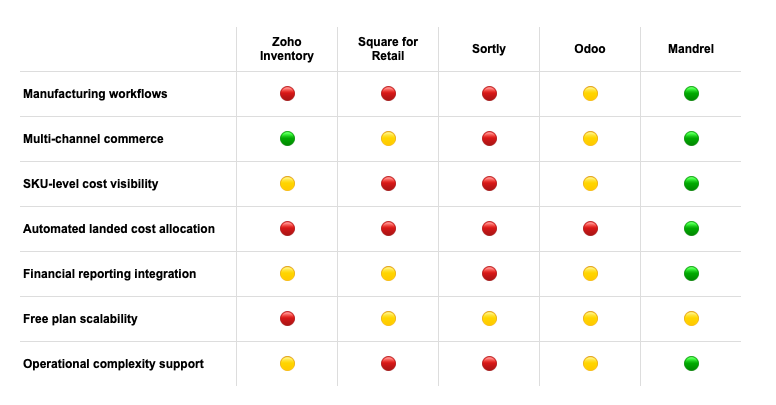
🟢 Strong capability
🟡 Limited / partial capability
🔴 Not supported / not core functionality
The catch: what to watch out for with free tools
While "free" is a hard price to beat, it’s smart to go in with your eyes open. Free inventory management software can be a fantastic starting point for new or very small businesses, but these tools almost always come with limitations that can create roadblocks as you grow. Think of them less as a permanent solution and more as a trial run or a temporary fix. The main challenge is that these limitations aren't always obvious until you’re deep in the weeds of running your business.
The most common trade-offs for a zero-dollar price tag are strict caps on usage, missing advanced features, and a lack of dedicated support. You might find yourself spending hours creating manual workarounds for a task that a paid tool could automate in seconds. This section will walk you through the typical catches that come with free software, so you can make an informed choice and know exactly when it’s time to look for a more robust solution to support your business growth.
Free plan features and limits
Free plans are designed to get you started, but they have built-in ceilings to encourage you to upgrade. The most common limitations are caps on the number of SKUs you can manage and the volume of orders you can process each month. For a brand with a small product line and low sales volume, this might work for a while. However, as soon as you launch a new collection or a marketing campaign takes off, you can hit these limits fast. You'll also find restrictions on how many team members can use the software—often just one—and how many warehouses or sales channels you can connect. This makes it tough to get a complete view of your business if you sell on both Shopify and Amazon, for example. Finally, you'll miss out on advanced financial reporting and dedicated support, leaving you to figure things out on your own when problems arise.
Free plan features and limits
Free plans are designed to get you started, but they have built-in ceilings to encourage you to upgrade. The most common limitations are caps on the number of SKUs you can manage and the volume of orders you can process each month. For a brand with a small product line and low sales volume, this might work for a while. However, as soon as you launch a new collection or a marketing campaign takes off, you can hit these limits fast. You'll also find restrictions on how many team members can use the software—often just one—and how many warehouses or sales channels you can connect. This makes it tough to get a complete view of your business if you sell on both Shopify and Amazon, for example. Finally, you'll miss out on advanced financial reporting and dedicated support, leaving you to figure things out on your own when problems arise.
Free plan features and limits
Free plans are designed to get you started, but they have built-in ceilings to encourage you to upgrade. The most common limitations are caps on the number of SKUs you can manage and the volume of orders you can process each month. For a brand with a small product line and low sales volume, this might work for a while. However, as soon as you launch a new collection or a marketing campaign takes off, you can hit these limits fast. You'll also find restrictions on how many team members can use the software—often just one—and how many warehouses or sales channels you can connect. This makes it tough to get a complete view of your business if you sell on both Shopify and Amazon, for example. Finally, you'll miss out on advanced financial reporting and dedicated support, leaving you to figure things out on your own when problems arise.
Free plan features and limits
The most common catch with free software is the built-in limitations. These platforms are designed to give you a taste of what’s possible, but they hold back the most powerful features for paying customers. You’ll often run into caps on the number of SKUs you can manage, the monthly order volume, or the number of users who can access the system. Some tools limit you to a single warehouse or sales channel, which becomes a problem as soon as you expand to a 3PL or start selling on a new marketplace. These limits can feel generous when you’re just starting, but a successful product launch or holiday season can push you over the edge overnight, forcing a scramble for a new solution.
Other free inventory tools to consider
Beyond the more well-known platforms, several other free tools cater to specific needs. These options range from simple, no-frills stock trackers to more complex, open-source systems. While they may not offer the comprehensive financial and operational integration of a true ERP, they can be a good fit for businesses with very specific use cases. For example, a hobbyist who needs to track electronic components has different needs than a growing CPG brand managing finished goods across multiple warehouses. The following tools are worth knowing about as you map out the landscape of what’s available at no cost.
Stockpile by Canvus
If you’re looking for a simple, straightforward way to get your inventory out of a spreadsheet, Stockpile is a solid starting point. It’s a free online tool designed to make basic stock tracking quick and easy. Think of it as a digital ledger for your products. It doesn't have the advanced features of a paid system, like multi-channel sales syncing or landed cost calculations, but it handles the fundamentals of adding items, recording sales, and tracking stock levels. For a very small business or a solopreneur who just needs to manage their inventory without any complexity, it’s a clean and simple solution.
SalesBinder
SalesBinder is a step up for businesses that have started to expand their physical footprint. Its free plan is particularly useful for managing inventory across a few different locations. It also supports multiple currencies, which is a key feature if you’re sourcing products from international suppliers or selling to customers in other countries. While it provides more location flexibility than many other free options, it’s still a tool focused on inventory quantities rather than the deeper financial metrics. It’s a good choice if your main challenge is knowing what you have and where it is, especially if your operations work with different currencies.
inFlow Inventory
inFlow Inventory offers a clean interface and a solid set of basic features that can help a new business get organized. It covers the essentials of tracking stock, managing purchase orders, and recording sales. However, its free version has fairly tight limits, and many businesses find they outgrow its free limits quickly as their order volume or product catalog expands. It serves as a good introduction to the principles of inventory management, but it’s best viewed as a temporary solution. Once you need to manage more complex workflows or a higher volume of transactions, you’ll likely need to upgrade or switch to a more scalable platform.
monday.com
monday.com isn't a dedicated inventory management system; it's a flexible work management platform that can be configured to track inventory. Using its templates, you can create a board to monitor stock levels, track orders, and manage supplier information. Its strength lies in its customizability and its ability to place inventory tracking within the context of larger projects. For example, you could track inventory for a new product launch alongside your marketing tasks and content calendar. However, it lacks the automated, real-time syncing and deep financial integrations of a specialized tool.
Bitrix24
Bitrix24 is another all-in-one platform that combines CRM, project management, and collaboration tools with a basic inventory management module. Its main appeal is having all these functions in a single ecosystem. If your team already uses Bitrix24 for sales and project tracking, using its inventory feature can feel like a natural extension. The system can handle stock control, purchase orders, and sales orders. However, because it’s a jack-of-all-trades, its inventory module isn't as robust as dedicated solutions. It’s a good option if you prioritize having a basic inventory management function inside a tool you already use for other business operations.
InvenTree
InvenTree is a different kind of tool altogether. It’s an open-source platform, which means it’s highly customizable and can be adapted to very specific needs. It’s particularly well-suited for businesses that need to manage parts and components for manufacturing or assembly. Think of it as a system for tracking the raw materials that go into your finished products. Because it’s open-source, it requires technical expertise to set up, customize, and maintain. It’s a powerful option for a manufacturer or electronics hobbyist who needs detailed parts management and has the development resources to support it.
Watch out for user and transaction caps
One of the first walls you’ll likely hit with a free tool is a usage cap. Most free plans limit the number of users who can access the software, the number of SKUs you can track, or the volume of orders you can process each month. For example, a plan might only allow one user login and cap you at 100 products and 50 monthly sales.
While that might sound reasonable when you’re just starting, a successful product launch or a good sales month could push you over the limit instantly. As Ordoro notes, "Free plans often have limitations on the number of users, items, or transactions per month." Once you hit that ceiling, your operations can grind to a halt until you upgrade, creating a stressful bottleneck right when your business is gaining momentum.
Be prepared for missing features and limited support
Free software is often a stripped-down version of a paid product, meaning you’ll only get access to the most basic features. While you can probably track inventory levels, you’ll likely miss out on more advanced functions critical for CPG brands, like barcode scanning, kitting and bundling, or lot traceability. As Extensiv points out, "Free options usually have limits on features, how many products you can track, or how many orders you can handle."
Another major consideration is support. When something goes wrong, you need help fast. Free plans typically offer self-service support through a knowledge base or community forum. You won’t get the dedicated phone, email, or chat support that comes with a paid plan, leaving you to solve urgent problems on your own.
Dealing with basic tracking and tricky integrations
Free tools are great for telling you what you have, but they often fall short of telling you the why and how behind your numbers. They provide basic stock counts but lack the sophisticated, SKU-level intelligence needed to understand your true profitability. You won’t find automated workflows for complex financial tasks like landed cost allocation or GAAP-compliant revenue recognition. This can leave your finance team with messy data and an incomplete picture of your business health.
Integrations can also be a headache. A free tool might not connect smoothly with your ecommerce platform, accounting software, or 3PL, forcing you to transfer data manually. This not only wastes time but also opens the door for costly human errors that can lead to stockouts or overselling.
What user reviews tell you about the downsides
One of the best ways to understand a free tool’s limitations is to see what other users are saying. A common theme you’ll find on software review sites is that while founders appreciate a free starting point, they quickly feel the constraints. As one Zoho Inventory review notes, "Users love the free version because it offers many features without costing money... However, some users find that the limitations can hinder their operations as they grow."
This pattern is a clear signal. Look for reviews that specifically mention scalability or what happens when a business outgrows the free plan. These firsthand accounts give you a realistic preview of the challenges you might face down the road and help you anticipate your own company’s needs.
Knowing when it's time to upgrade
So, how do you know when your business has outgrown a free tool? The signs are usually clear. You’re spending more time on manual data entry and workarounds than on growing your business. You’re constantly bumping up against user or transaction limits. Your inventory data is inaccurate, leading to stockouts. Or, you simply can’t get the detailed financial reports you need to make smart decisions.
As Extensiv explains, "Businesses with more complex needs, a lot of sales, or special requirements... will likely need to pay for inventory management software." Moving to a paid platform isn’t just an added expense; it’s an investment in efficiency, accuracy, and scalability. When you’re ready for a system that can keep up with your growth, it might be time to book a demo for a more powerful solution.
You need to manage multiple warehouses
When your business expands to a second warehouse or starts working with a third-party logistics (3PL) partner, a free tool will quickly show its limits. Most are designed for a single location, leaving you to track inventory across multiple sites with separate spreadsheets. This manual process is not only a huge time sink but also a recipe for errors, making it impossible to get a clear, unified view of your stock. A capable inventory tool allows you to track and transfer stock between locations from a single system. This centralized control is essential for efficient fulfillment, accurate forecasting, and preventing stockouts in one location while another is overstocked.
You need advanced tracking for batches or serial numbers
For many CPG brands, especially in food, beauty, or supplements, tracking products by batch or lot number isn't optional—it's a requirement for safety and compliance. In the event of a recall, you need to know exactly which batch was affected and where it went. Similarly, businesses selling high-value electronics or equipment need to track individual serial numbers. These advanced functions are almost never included in free software. As Extensiv notes, with free tools, "you’ll likely miss out on more advanced functions critical for CPG brands, like barcode scanning, kitting and bundling, or lot traceability." This is a non-negotiable feature for any brand where quality control is paramount.
Your team needs different access levels
As your team grows, so does the need for security and role-based access. Your warehouse manager needs to update stock levels, but they probably shouldn't see your profit margins. Your finance team needs access to cost data but not necessarily operational fulfillment workflows. Free plans typically limit the number of users and rarely offer customizable permissions. This means everyone either shares a single login (a security nightmare) or has full access to everything. When you hit that user cap, your "operations can grind to a halt until you upgrade, creating a stressful bottleneck right when your business is gaining momentum." A scalable system allows you to set granular permissions for each team member, protecting sensitive data and ensuring everyone has access only to what they need to do their job.
You want to automate reordering
One of the biggest time-savers a paid inventory system offers is automation, especially when it comes to purchasing. Free tools typically lack this. You’re left to manually monitor stock levels, calculate reorder points, and create purchase orders for every supplier. This manual work is not only tedious but also prone to error, often leading to costly stockouts or excess inventory that ties up your cash. A more advanced system can automate this entire workflow by setting reorder points based on sales data and lead times, automatically generating POs when stock runs low. This frees up your team to focus on more strategic tasks, like negotiating better terms with suppliers or planning new product launches.
Related articles
Spreadsheets, IMS, or ERP? The Architecture Question Most Brands Miss
SKU-Level Economics: What Your Gross Margin Isn’t Telling You
Turn POs into Profits: Strategies for Optimizing Purchase Orders
Frequently asked questions
Is free inventory software really free, or are there hidden costs?
The software itself is typically free to use, but the "costs" often show up in other ways. You might pay with your time by manually entering data that a paid tool would automate. You could also face opportunity costs, like losing sales due to an unexpected stockout because your free tool didn't provide accurate, real-time updates. The biggest cost is often hitting a growth ceiling, where the software's limitations on orders or products stop your business from scaling smoothly.
When is the right time to switch from a spreadsheet to inventory software?
If you're spending more than an hour or two a week updating your inventory spreadsheet, it's time to switch. Other signs include making ordering mistakes based on old data, accidentally selling out-of-stock items, or having no clear idea of your best and worst-selling products. A free inventory tool is a great first step away from spreadsheets to build better habits and bring some order to your operations.
How do I know when I've outgrown my free inventory tool?
You'll start to feel the friction. Your team might need more user accounts than the plan allows, or you'll constantly be worried about hitting your monthly order limit. A major sign is when you can't get the financial details you need, like understanding your profit on a specific SKU after accounting for all associated costs. When your inventory system creates more questions than it answers, you've definitely outgrown it.
Can free software handle more complex needs like product bundles or kits?
Generally, this is where free tools start to fall short. Basic inventory tracking is their strong suit, but managing kits (where multiple SKUs are sold as one unit) requires more advanced logic. A free system likely won't be able to automatically adjust the stock levels of the individual components when a bundle is sold. If kitting is a core part of your sales strategy, you will probably need a more robust, paid solution from the start.
What's the biggest mistake people make when choosing a free inventory tool?
The most common mistake is choosing a tool that only solves today's problems. It's easy to pick something that fits your current, small-scale operation perfectly. But if you have plans to grow, you should think about where your business will be in six months or a year. Consider a system that offers a clear upgrade path or, better yet, a scalable platform that can provide the deep financial and operational intelligence you'll need as you expand.